
Metal Organic Frameworks#
In this tutorial we will cover:
how we can build metal organic frameworks in BuildAMol from scratch
Metal Organic Frameworks (MOF) are a class of materials consisting of metal ions and organic linker molecules that have been studied for purposes of catalysis or gas filtering. Actually, if you are reading this tutorial you likely know more about them than I do, so let’s just jump in!
In this tutorial we will build a pillard paddlewheel MOF as is shown in figure 1b of the review by Deria et al. (2014) 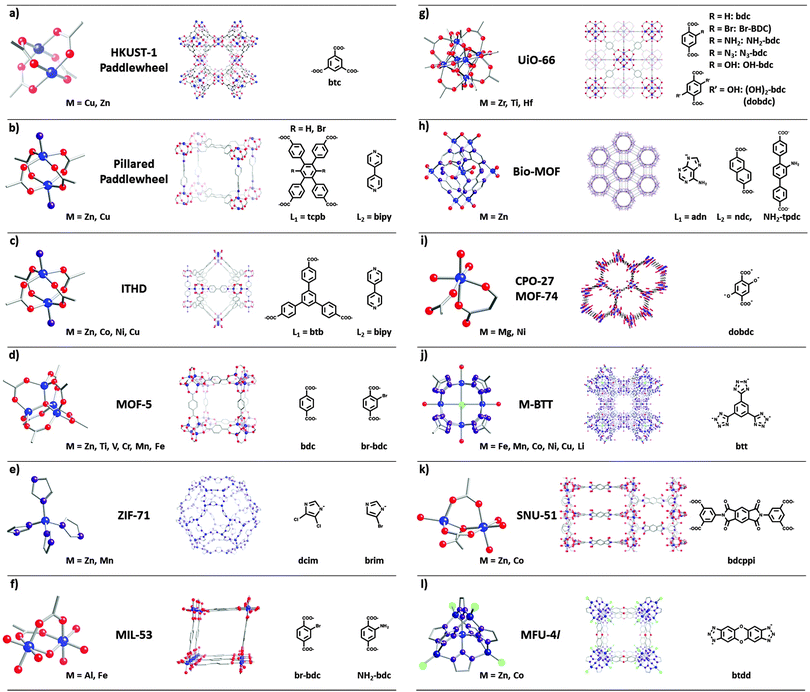
Since BuildAMol does by default not have any trick up it’s sleeve to create MOFs we will have to make the structure from hand. Also, the highly geometric nature of the overall structure means that we cannot really use the attach method to assemble our fragments since that method is designed to more freely find good spatial placements instead of maintaining a good orientation for macro-assembly. As a consequence we will be assembling the fragments using merge (which does not alter the
placement of fragments in any way) and manually establish the placements.
Sounds like a lot of work, right? Well, it is not as straightforward as calling some function a few times but hopefully it will be clear by the end. Admittedly, this tutorial will be a lengthy one but hopefully it will be very illustrative for cases where manual assembly is the only option to obtain the desired structure. If you make it through this tutorial you will surely be a master at using methods such as align_to, superimpose_to_bond, or move, all of which we will be using to
get the right fragment in the right orientation at the right position.
Let’s go!
[1]:
import buildamol as bam
import numpy as np
Get the basic components#
The structure essentiall consists of two basic units, the metal complex and benzene rings. We can get the benzene rings from BuildAMol’s built-in data but the metal complex is a more challenging bit. Spoilers ahead: we’ll be just loading a file with an existing complex, which I prepared previously with the help of Stk, which is really good when it comes to metal complexes.
[2]:
bam.load_small_molecules()

bnz = bam.molecule("BNZ")
paddle = bam.molecule("./files/paddlewheel.xml")

# here we also define the size of the total system we want to build
X_STACK = 5    # number of molecules in the x direction
Y_STACK = 5    # number of rows in the y direction
Z_STACK = 5    # number of layers in the z direction

# let's actually look at the metal complex component that we are going to start with
paddle.py3dmol().show()
You appear to be running in JupyterLab (or JavaScript failed to load for some other reason). You need to install the 3dmol extension:
jupyter labextension install jupyterlab_3dmol
Make the basic stackable units#
Make the planar linkers between metal complexes#
We can make the planar linkers by simply adding some benzenes together. Because I tried this out a bunch of times, I also know that we will have to bend the structure a little to make sure the geometries of the paddle metal complexes and the planar linkers will be stackable
[3]:
# make the planar linker of five benzenes
planar_linker = bam.benzylate(bnz.copy(), ["C1", "C2", "C4", "C5"])

v = planar_linker.py3dmol()

# now bend the bonds that connect the peripheral benzenes a little
angle = 11.5
sign = 1
for i, bond in enumerate(planar_linker.get_residue_connections(triplet=False)):
    planar_linker.bend_at_bond(*bond, angle, neighbor="H6")
    if i == 1: # it's assymmetric otherwise...
        angle = -angle

v += planar_linker.py3dmol(color="red")
v.show()
You appear to be running in JupyterLab (or JavaScript failed to load for some other reason). You need to install the 3dmol extension:
jupyter labextension install jupyterlab_3dmol
Now we can add the metal complexes to the linkers:
[4]:
unit = planar_linker.copy()

# we will add metal complexes to the peripheral benzenes
# (the order itself is not so important but the whole downstream process
# will be dependent on the order here, i.e. different
# order = different residue numbers in the cells below!)
for res in (2, 4, 3, 5):
    incoming = paddle.copy()
    pres = incoming.get_residue(1)
    ures = unit.get_residue(res)
    ref = (pres.get_atom("H1"), pres.get_atom("C1"))
    target = (ures.get_atom("C4"), ures.get_atom("H4"))

    # superimpose the icoming metal complex to the right position
    # then align it to the z_axis (the inversion term was necessary since one complex
    # would always align in the inverse orientation, I don't know why only this one tbh...)
    incoming.superimpose_to_bond(ref, target)
    incoming.align_to(bam.structural.z_axis * (-1 if res == 2 else 1))

    # now merge the incoming complex with the linker
    unit.remove_atoms(target[1])
    incoming.remove_atoms(ref[0])
    unit.merge(incoming)
    unit._add_bond(ref[1], target[0])

# we want to make sure everything is one single
# chain (since merge would normally add new chains)
unit.squash_chains()

# also we will remove all hydrogens since we don't care about them
unit.remove_hydrogens()

unit.py3dmol().show()
You appear to be running in JupyterLab (or JavaScript failed to load for some other reason). You need to install the 3dmol extension:
jupyter labextension install jupyterlab_3dmol
And there we have our basic unit. From this we can now make derivatives that we will stack to create our final supra-structure.
Stacking in the first direction#
We have our basic unit. From this will wil derivate a second molecule row_tile which we will stack in the y-direction. Our strategy is to first stack in one direction that use that “full row” to stack in the second direction and then use that “full layer” to stack in the third direction.
Making the Row-Tile#
To make our row_tile molecules we will selectively remove two metal complexes again from the unit. Like so:
[5]:
# make the row_tile by removing the two "top" complexes
row_tile = unit.copy()
# remove the complexes (if you don't know how we know these are the right numbers
# you can always call `unit.plotly().show()` to check again which residues are where)
row_tile -= row_tile.get_residues(6, 8)

row_tile.py3dmol().show()
You appear to be running in JupyterLab (or JavaScript failed to load for some other reason). You need to install the 3dmol extension:
jupyter labextension install jupyterlab_3dmol
In order to stack our row_tiles we will need to align each incoming tile to the metal complexes of the previous tile. Here is how we can do it:
[6]:
stacked = unit.copy()

# first compute the distance between the stacked units
# (empirically, I just tried out a few times until it looked good)
diff = stacked.compute_length_along_axis("x") - 0.4 * paddle.compute_length_along_axis("x") + 1

for i in range(Y_STACK):

    # get a new row_tile
    incoming = row_tile.copy()

    # move it to the right position
    incoming.move([0, (i+1) * diff, 0])

    # and merge into the structure
    stacked.merge(incoming)

# finally we make sure everything is just one chain
# and we infer the bonds between the stacked units
stacked.squash_chains()
stacked.infer_bonds(restrict_residues=False)
stacked.py3dmol().show()
You appear to be running in JupyterLab (or JavaScript failed to load for some other reason). You need to install the 3dmol extension:
jupyter labextension install jupyterlab_3dmol
Alrighty, there we have our first “full row” of stacked units! So, to summarize, we used the following method to get here: superimpose_to_bond in order to place incoming metal complexes in the right spot. We also used align_to to make sure we have a good orientation of metal complexes (i.e. vertical). We used bend_at_bond to slightly distort the planar_linker and we used merge to assemble our fragments into a single molecule.
Stacking in second direction#
Now we will go about stacking the “full row” in x-direction in order to get a “full layer”.
Making the Plane-Tile#
The plane_tile will be derived from stacked. Just like for the row_tile we will be removing some metal complexes from the structure. However, this time we don’t want to use residue numbers (since we don’t know them and we don’t want to look at the structure to get the numbers manually since there are so many residues now) but instead we will use a little geometric thinking to remove “all metal complexes on one side”. Here’s how:
[7]:
plane_tile = stacked.copy()

# remove all UNL's that are one one side
# (well, we know those two still from before,
# but you can always check with `plane_tile.plotly().show()`
to_remove = plane_tile.get_residues(8, 7)

# now we compute the vector between the two residue centers
# which will give us the trajectory of the line where all
# other metal complexes we want to remove will also be
trajectory = bam.structural.vector_between(*to_remove)

# now we iterate over all metal complexes (UNL residue name)
for unl in plane_tile.get_residues("UNL"):
    if unl in to_remove:
        continue

    # we compute again the vector from the residue to one of
    # our starting complexes (8 or 7 does not matter)
    vec = unl.coord - to_remove[0].coord

    # and compute the cosine similarity
    # if the similarity is close to 1 the metal complex
    # is on the line and we should remove it
    dot = np.dot(trajectory, vec)

    trajectory_magnitude = np.linalg.norm(trajectory)
    line_segment_magnitude = np.linalg.norm(vec)

    cosine_similarity = dot / (trajectory_magnitude * line_segment_magnitude)

    if cosine_similarity > 0.995:  # Adjust the threshold as per your requirement
        to_remove.append(unl)

# now remove all identified metal complexes
plane_tile.remove_residues(*to_remove)
plane_tile.py3dmol().show()
You appear to be running in JupyterLab (or JavaScript failed to load for some other reason). You need to install the 3dmol extension:
jupyter labextension install jupyterlab_3dmol
And there we have our plane_tile unit which we can now stack to get our “full layer”.
[8]:
full_layer = stacked.copy()

# compute the distance we need to shift each incoming tile as the "width" of the x-stacked - "width" of the metal complexes
diff = full_layer.compute_length_along_axis("x") - paddle.compute_length_along_axis("x") + 3.25

for i in range(X_STACK):

    # get a new plane-tile and move it to the right spot
    incoming = plane_tile.copy()
    incoming.move([(i+1) * diff, 0, 0])

    # then merge into the structure
    full_layer.merge(incoming)

full_layer.squash_chains()
full_layer.infer_bonds(restrict_residues=False)

full_layer.py3dmol().show()
You appear to be running in JupyterLab (or JavaScript failed to load for some other reason). You need to install the 3dmol extension:
jupyter labextension install jupyterlab_3dmol
Perfect, there is our full_layer!
Stacking in third direction#
Now we can start to think about staking our full_layer in the z direction. To do so we first must get the axial_linkers however, which connect the different layers.
Making the axial linkers between layers#
The axial linkers are simply two benzene rings in our case so we can make them very easily using:
[9]:
# this line will make a two-benzene molecule whith only one chain and residue named LNK
axial_linker = bam.benzylate(bnz.copy(), "C1").squash(resname="LNK").autolabel()
axial_linker.py3dmol().show()
You appear to be running in JupyterLab (or JavaScript failed to load for some other reason). You need to install the 3dmol extension:
jupyter labextension install jupyterlab_3dmol
Making the Z-Tile#
The stackable unit we want is the full_layer with axial_linkers attached. So we will now distribute a linker on top of each metal complex in the layer.
[11]:
z_tile = full_layer.copy()

for unl in z_tile.get_residues("UNL"):

    incoming = axial_linker.copy()

    # we will align the incoming linker so that it's meta carbon on one ring is directly above the nitrogen in the metal complexes
    # (did I say we would not use superimpose anymore? well, guess I lied, here is one more superimpose)
    # (btw. how did I know about C5 being a meta carbon? I used `autolabel` so I knew this would be one... But if you are unsure
    # use `axial_linker.plotly().show()` to see for yourself)
    ref = (incoming.get_atom("C5"), incoming.get_atom("H5"))

    # now for the target nitrogen and iron atoms. The tricky bit is that even though we aligned to the Z-axis (at the beginning)
    # we cannot be sure whether NA or NB is actually going to be the "upward" nitrogen. So to be on the save side, we will use
    # this little snippet to get the right one in each case:
    N1 = unl.get_atom("NA")
    N2 = unl.get_atom("NB")
    if N1.coord[2] > N2.coord[2]:
        target = N1, unl.get_atom("FEA")
    else:
        target = N2, unl.get_atom("FEB")

    # now we can superimpose the linker
    incoming.superimpose_to_bond(ref, target)

    # now the linker is still a little too low (we aligned to N-FE, remember)
    # so we just push it up a little bit
    incoming.move([0, 0, 1.5])

    # and merge it into the structure (but without hydrogens)
    incoming.remove_hydrogens()
    z_tile.merge(incoming)

z_tile.squash_chains()
z_tile.infer_bonds(restrict_residues=False)
z_tile.py3dmol().show()
You appear to be running in JupyterLab (or JavaScript failed to load for some other reason). You need to install the 3dmol extension:
jupyter labextension install jupyterlab_3dmol
Great! Now we have our stackable unit for the z-direction! The only thing left to do is stack the whole thing to get our final structure!
[12]:
final = z_tile.copy()

# we again compute the distance beforehand so we can just use `move` to place
diff = z_tile.compute_length_along_axis("z") + 1

for i in range(Z_STACK):

    # we want the top-most layer to be the one without axial linkers
    # so we distinguish which fragment is incoming
    if i == Z_STACK -1:
        incoming = full_layer.copy()
    else:
        incoming = z_tile.copy()

    incoming.move([0, 0, (i+1) * diff])
    final.merge(incoming)

final.infer_bonds(restrict_residues=False)
final.py3dmol().show()
You appear to be running in JupyterLab (or JavaScript failed to load for some other reason). You need to install the 3dmol extension:
jupyter labextension install jupyterlab_3dmol
And there we have our final structure! Let’s save it to a PDB file:
[13]:
final.to_pdb("./files/MOF.pdb")
So, let’s recapitulate what we did in order to get here. We could not straightforwardly “attach” fragments together because we required them to be in a specific spatial arrangement in order to stack multiple molecules together into one regular large construct. Therefore we employed methods such as superimpose_to_bond, align_to, or move in order to obtain a desirable placement and orientation of our incoming fragments. Then we used merge to assemble larger structures.
The most difficult part was assembling the basic unit, where we neaded to superimpose, align, and also bend the structure.
Especially the last part is not something that we could have known a priori but we learned was necessary after having tried to assemble the row_tile. Therefore, even if this workflow looks very “linear” I did not write it from start to finish before actually pressing the play button! Developing your pipeline for creating the structures you need will involve experimentation, so be sure to run your code as often as possible and be sure to save your work regularly or work on copies!
However, as you were hopefully able to see, creating a regular assembly of fragments is very straightforward in BuildAMol thanks to methos such as move or align_to that allow us to easily create assemblies of fragments in specific orientations by hand.
With that we have reached the end of this tutorial! Hopefully you now feel able to create your own MOFs! Thanks for checking out this tutorial and good luck with your project using BuildAMol!