
Making a Rotaxane (easy)#
In this tutorial we will cover:
how we can use BuildAMol when we want to combine multiple molecules into one system
how we can use BuildAMol’s RotatronBuilder to align a circular molecule along a scaffold
The primary purpose of BuildAMol is to build individual molecular structures. However, sometimes we want to assemble a system with multiple individual molecules that form a system, for instance when doing molecular dynamics simulations.
In this tutorial we will be assembling a rotaxane. Rotaxanes are compounds that consist of a scaffold-like structure around which a circular molecule is wrapped. However, there is no covalent bond between the scaffold and ring.
For this tutorial we shall be building this compound below from a paper by Tian et al. (2020)
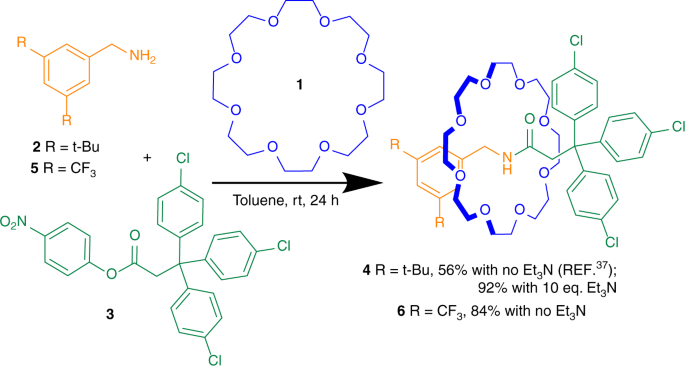
As we can see, the final compound on the right consists of two individual molecules. One circular structure (blue) and the scaffold (green and orange).
We will first build the components separately and then assemble a system for PDB export from these.
[5]:
import plotly
plotly.offline.init_notebook_mode()
[4]:
import buildamol as bam

bam.load_small_molecules()
Making the ring#
Let’s start by making the ring-structure. We can see that the basic unit is an ethanol molecule that is repeated eight times. We could make a linear polymer of ethanol molecules and then circularize it to get the ring structure. However, there is actually a much faster way of getting our desired structure. Namely, we can make a circular alkane ring of the right size and simple change the element of every third carbon to oxygen to achieve the same result, just faster! Why faster? Because BuildAMol has an extention to make cyclic alkanes directly without any need for optimization. Here’s how:
[6]:
# import the polymers module from the buildamol extensions
from buildamol.extensions import polymers

# define the number of carbons we want in our cyclic alkane.
N = 24
ring = polymers.cyclic_alkane(N)

# now change every third to an oxygen
i = 3
while i <= N:
    ring.change_element(f"C{i}", "O")
    i += 3

# and inspect the ring
# (don't worry about the distorted view,
# that's Plotly's fault which is due to automatic
# scaling of all three spacial axes to fit into a cube)
ring.show()
/Users/noahhk/anaconda3/envs/glyco2/lib/python3.11/site-packages/plotly/express/_core.py:1985: FutureWarning:

When grouping with a length-1 list-like, you will need to pass a length-1 tuple to get_group in a future version of pandas. Pass `(name,)` instead of `name` to silence this warning.
Making the scaffold#
Now that we have the ring we can start making the scaffold.
[7]:
# let's again get some compounds to use
neck = bam.read_smiles("CNC(=O)CC").autolabel()
neck.rename_residue(1, "NCK") # rename the residue to "NCK", which will be handy later
benzene = bam.get_compound("benzene")
cf3_group = bam.molecule("trifluoromethane").autolabel()

# make the chloro benzenes of the green scaffold-part
chloro_benzene = benzene.copy()
chloro_benzene.change_element("H1", "Cl")

# and make the methyl-fluoro benzenes of the orange scaffold-part
link = bam.linkage("C3", "C1")
fluoro_benzene = benzene % link + cf3_group
link.atom1 = "C5"
fluoro_benzene = fluoro_benzene % link + cf3_group

fluoro_benzene.show()
/Users/noahhk/anaconda3/envs/glyco2/lib/python3.11/site-packages/plotly/express/_core.py:1985: FutureWarning:

When grouping with a length-1 list-like, you will need to pass a length-1 tuple to get_group in a future version of pandas. Pass `(name,)` instead of `name` to silence this warning.
Now with the components ready we can assemble the full scaffold…
[8]:
# attach the fluoro benzene to the neck
link = bam.linkage("C1", "C4")
scaffold = fluoro_benzene @ 1 % link + neck

# and now attach the chloro benzenes to the scaffold
link = bam.linkage("C3", "C4")
scaffold @ -1 % link # fix the (current) last residue as the target and set the linkage to always use
for i in range(3):
    scaffold += chloro_benzene

scaffold.show()
/Users/noahhk/anaconda3/envs/glyco2/lib/python3.11/site-packages/plotly/express/_core.py:1985: FutureWarning:

When grouping with a length-1 list-like, you will need to pass a length-1 tuple to get_group in a future version of pandas. Pass `(name,)` instead of `name` to silence this warning.
And there we have the scaffold molecule. Let’s also quickly optimize the structure…
[9]:
scaffold_optimized = scaffold.optimize(inplace=False)
scaffold_optimized.show()
/Users/noahhk/anaconda3/envs/glyco2/lib/python3.11/site-packages/plotly/express/_core.py:1985: FutureWarning:

When grouping with a length-1 list-like, you will need to pass a length-1 tuple to get_group in a future version of pandas. Pass `(name,)` instead of `name` to silence this warning.
Using the RotaxaneBuilder#
Now how do we assemble our rotaxane from this? Well, either we manually create an optimization system that will try to fit our ring somehow around the scaffold center, or we use the RotaxaneBuilder class from the BuildAMol Extensions. Here’s how:
[11]:
# import the RotaxaneBuilder
from buildamol.extensions.complexes import RotaxaneBuilder

builder = RotaxaneBuilder()

# use the builder to align the ring around the scaffold
# (both ring and scaffold are still individual molecules)
builder.distribute_along_axle(axle=scaffold_optimized, cycles=[ring])

# let's inspect the result
v = scaffold_optimized.draw(show_atoms=False)
v += ring.draw(show_atoms=False, line_color="red")
v.show()
Well, that looks quite promising! The alignment seems good, just the position is still a bit off. But we can just use Molecule.move_to to move the ring onto the right location somewhere at the center of the scaffold. Right around where the NCK residue is (that’s why we renamed the residue before ;))
[12]:
# move the ring to the right spot
ring.move_to(scaffold_optimized.get_residue("NCK").coord)

# and check again that the location now is around the center of the scaffold
v += ring.draw(show_atoms=False, line_color="blue")
v.show()
Merging the system#
Alrighty, that looks alright. Now with this done, we can finally assemble the system as a whole into a single molecule object using the merge method.
[13]:
# add the ring as a second chain to the scaffold_optimized
scaffold_optimized.merge(ring)
[13]:
Molecule(BNZ)
And with this we are done! We can export our system to a file and now go on doing whatever we like with it.
[14]:
scaffold_optimized.to_molfile("./files/rotaxane.mol")
And with that we have reached the end of this tutorial. Hopefully you now know hot wo create multi-molecule systems in BuildAMol by making individual molecules, merging them together. And if you are particularly interested in rotaxanes, you are now able to use the RotaxaneBuilder to make simple rotaxanes. If you are interested, you can also check out the more bare-bone and advanced implementation for this rotaxane which may be helpful if your problem cannot be directly solved with the RotaxaneBuilder.
Thanks for checking out this tutorial and good luck with your research using BuildAMol!