
Building Polyphenylene#
In this tutorial we will build the first reported dendrimer polyphenylene By Mullen et al.
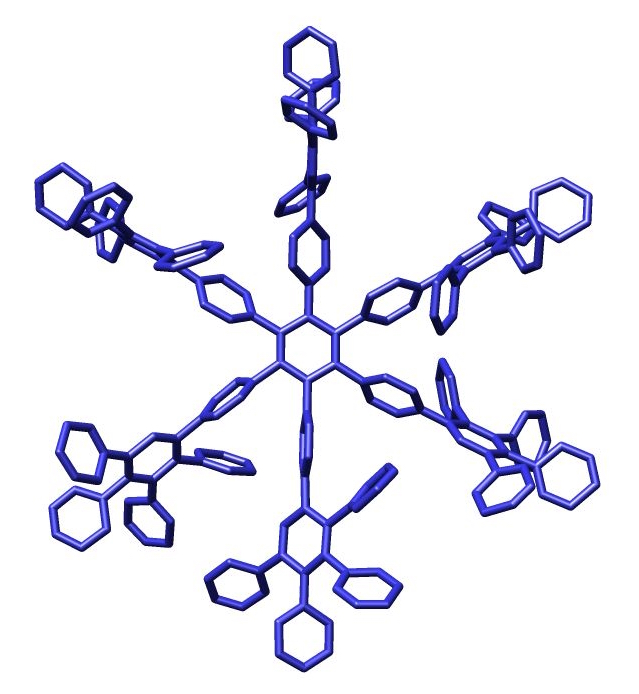
“Single-Crystal Structures of Polyphenylene Dendrimers”. Chemistry: A European Journal. 8 (17): 3858–3864. 2002. doi:10.1002/1521-3765(20020902)8:17<3858::AID-CHEM3858>3.0.CO;2-5.
We can generate the entire structure using benzene fragments. Because there are many fragments connecting to the same residues, we can automate some of the process using for-loops to make our life just a little bit easier. So let’s get started!
[1]:
import plotly
plotly.offline.init_notebook_mode()
[2]:
import buildamol as bam
First let’s get the benzene
[3]:
# we load the reference data for small molecules (containing benzene)
# (this is technically not necessary, since BuildAMol will automatically
# query PubChem for any unloaded compounds, but it's a good practice to load the molecules
# to make sure the atom labels are consistent)
bam.load_small_molecules()
[4]:
benzene = bam.get_compound("benzene")
# don't worry about the skewed visuals
# (that's because there are miniscule difference in the z-axis, < 1e-2A)
benzene.show()
/Users/noahhk/anaconda3/envs/glyco2/lib/python3.11/site-packages/plotly/express/_core.py:1985: FutureWarning:

When grouping with a length-1 list-like, you will need to pass a length-1 tuple to get_group in a future version of pandas. Pass `(name,)` instead of `name` to silence this warning.
We can start by generating the peripheral multi-rings by attaching five benzenes to one in the middle. We could for instance do something like this:
[5]:
# set up the linkage instructions
# from some atom to C1
link = bam.linkage(None, "C1")

# start with the central benzene ring
periphery = benzene.copy()

# now attach 5 more benzene rings to the central one
for carbon in range(1, 6):

    # update the linkage to the next carbon
    link.atom1 = f"C{carbon}"

    # attach one benzene to the central one
    # the at_residue is important to make sure we
    # always attach to the same benzene ring (which has the residue number 1)
    periphery.attach(benzene, link, at_residue=1)

periphery.show()
/Users/noahhk/anaconda3/envs/glyco2/lib/python3.11/site-packages/plotly/express/_core.py:1985: FutureWarning:

When grouping with a length-1 list-like, you will need to pass a length-1 tuple to get_group in a future version of pandas. Pass `(name,)` instead of `name` to silence this warning.
Now that we have the periphery we can use the same setup to attach peripheries to one central benzene ring…
[6]:
# setup a new linkage
link2 = bam.linkage("C1", "C4")

# set a new attach residue for the periphery (now it's the second residue)
periphery.set_attach_residue(2)

# now make the central core
core = benzene.copy()

# and attach the periphery to the core
for carbon in core.get_atoms("C", by="element"):
    link2.atom1 = carbon.id

    core.attach(periphery, link2, at_residue=1)

core.show()
/Users/noahhk/anaconda3/envs/glyco2/lib/python3.11/site-packages/plotly/express/_core.py:1985: FutureWarning:

When grouping with a length-1 list-like, you will need to pass a length-1 tuple to get_group in a future version of pandas. Pass `(name,)` instead of `name` to silence this warning.
Now that looks fancy! But it is quite cramped still. So let’s optimize the structure.
[7]:
graph = core.get_atom_graph()
edges = core.get_residue_connections()
edges = graph.direct_edges(graph.central_node, edges)

env = bam.optimizers.DistanceRotatron(graph, edges)
[8]:
core_opt = bam.optimizers.optimize(core.copy(), env, "swarm")
[9]:
core_opt.show()
/Users/noahhk/anaconda3/envs/glyco2/lib/python3.11/site-packages/plotly/express/_core.py:1985: FutureWarning:

When grouping with a length-1 list-like, you will need to pass a length-1 tuple to get_group in a future version of pandas. Pass `(name,)` instead of `name` to silence this warning.
Now that looks better! Let’s save it to a PDB file.
[10]:
core_opt.to_pdb("./files/polyphenylene.pdb")